
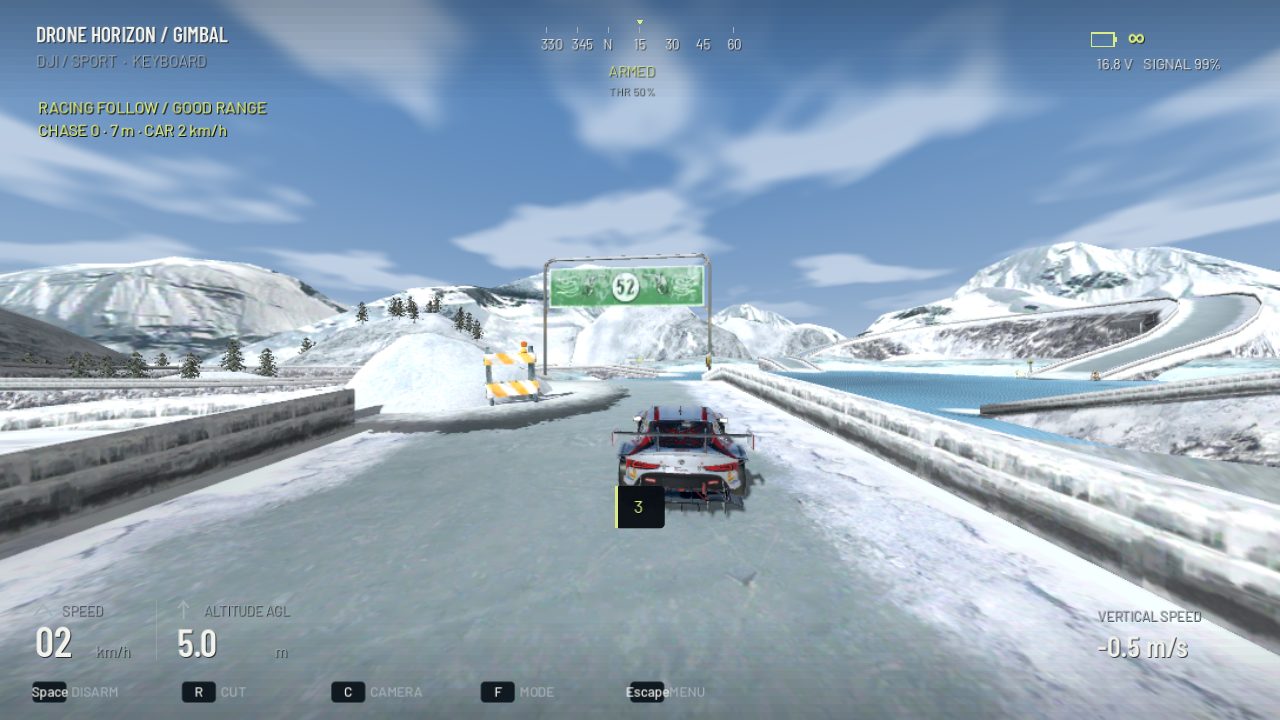
Follow Car in Drone Horizon is a filming challenge: an AI car drives the mountain route while you continue flying the drone. It is not an autonomous Follow Me mode that controls the aircraft for you. The useful practice task is maintaining a deliberate relative position while the subject moves.
The active implementation selects Racing Mountains, creates the vehicle and starts an open-ended pursuit session. It clears the normal gate course so invisible race-frame collisions do not remain in the pursuit airspace.
Set the pace and the flight style
The pursuit menu offers Easy, Normal and Hard car pace, an optional chase score and a direction marker. It also shows the selected flight style and gives access to flight settings. Choose the pace that leaves enough attention for framing and recovery.
Manual FPV asks you to coordinate body attitude and collective while following. The DJI-style stabilized family provides a different camera-drone control task. Neither choice makes the player drone automatically follow the car.
What the score looks for
When scoring is enabled, the implementation considers a range of conditions: the drone is armed, the car is within the scoring distance band, it is in front of the camera and reasonably near the center of the image, and line of sight is clear. Movement smoothness also affects the accumulated score.
| Element | Practice implication |
|---|---|
| Subject within range | Avoid falling far behind or crowding the car |
| Subject in the frame | Plan yaw and camera changes before losing it |
| Clear line of sight | Terrain and obstacles still matter |
| Smooth movement | Large corrections can hurt the filming task |
| Optional score | You can practice a line without chasing points |
These are game-specific scoring rules. A high score is not a professional cinematography qualification, and the score should not replace watching the actual shot.
Practice one relative position first
Begin behind and offset from the vehicle with a clear view of the route. Try to keep its apparent size and position fairly steady. If it grows rapidly in the frame, you may be closing too quickly; if it shrinks and disappears behind scenery, plan an earlier speed or heading adjustment.
Avoid immediately attempting low side passes through tunnels. First learn how the car's changing direction affects your line. The cinematic flying guide explains why path and framing should be planned separately.
Understand the route and recovery
The mode uses the mountain road and its lake stunt segment. The car continues its route after the start countdown rather than ending a session because the drone briefly loses it. Pause and leaving the mode remain separate controls.
A Return to Car recovery option can place the drone near the route after you lose the subject. The recovery disarms and prepares another takeoff; it is not an in-flight teleport that preserves a perfect shot. Use it to restart a practice segment calmly.
Build difficulty through shot choices
After a steady following position becomes repeatable, try a wider offset, a gradual approach or a planned exit from the shot. Change only one element at a time. If the view becomes chaotic, slow the pace or return to the simpler position rather than increasing sensitivity immediately.
Use orbit practice for stationary-subject coordination and smooth turns for the transitions. The maps overview distinguishes this pursuit environment from Neon City's ordered gate racing and Harbor City's urban free-flight routes.